
Shadow AI: What It Is, Why It Happens, and How Small Businesses Can Manage It
Shadow AI is widespread, and your employees may already be using unapproved tools. They may paste client documents into personal chatbots, connect AI meeting assistants to their calendars, or install browser extensions that can access page content—all without company approval. This guide explains what shadow AI looks like in a business with 10–150 employees, why your business should address it, which detection tools to consider, and how to start managing it through a practical 90-day plan.
Key takeaways
Shadow AI refers to any work use of AI tools, AI features, or AI agents that your company hasn’t approved. It is a subset of shadow IT that can introduce additional data, output, and decision risks.
It’s widespread in smaller firms. In WatchGuard’s 2026 survey of employees at 50–500 person organizations, 64% admitted using unauthorized AI tools for work.
It’s expensive when it goes wrong. IBM found shadow AI involved in 43% of breached organizations in 2026, with those breaches averaging $5.39 million.
A blanket ban alone may leave important risks unresolved. Provide an approved AI tool that meets employees’ needs, restrict high-risk tools, and publish clear data rules.
Discovery comes first. Start with what’s already in Microsoft 365 or Google Workspace, then add browser, endpoint, or DLP controls based on size and risk.
A 90-day plan provides a practical starting framework for discovery, tool approval, policy development, and basic controls for businesses without a full-time security team.
What is shadow AI?
Shadow AI refers to the use of artificial intelligence (AI) tools, AI features, or AI agents for work without the knowledge, approval, or oversight of the people responsible for the company’s technology and data. Examples include an employee pasting a client contract into a personal account with an AI chatbot such as ChatGPT, connecting an unapproved meeting assistant to their calendar, installing a browser extension with access to page content, or using an AI feature that the company has not reviewed.
Understanding shadow AI starts with shadow IT. Shadow AI is a subset, but it carries a different kind of risk. Traditional shadow IT stores your data somewhere you don’t control. Shadow AI can also act on your data, generate content your business relies on, and third-party AI systems can keep what employees type in, with no record on your side of what was shared.
Common shadow AI tools include ChatGPT, Claude, Gemini, Perplexity, and Midjourney used through personal accounts; AI writing assistants and browser extensions; AI meeting notetakers; coding assistants such as GitHub Copilot; local models such as Ollama; and generative AI tools built into apps you already use.
For a 10–150 person business, the honest starting assumption is simple: some of your employees are already using AI for work. The question is which tools, with what information, under what rules. The rest of this guide shows how to find out.
Shadow AI examples: what it looks like in a 10–150 person business
Shadow AI rarely looks like a rogue project. It looks like a normal Tuesday. It isn’t limited to tech staff. Business users in every department are involved. Common examples we see most often, by role:
| Who | What they do | What data is involved |
|---|---|---|
|
Owner / Executive |
Pastes a draft acquisition letter or board memo into a personal chatbot to “tighten it up” |
Sensitive corporate information: deal terms, strategy, financials |
|
Finance / CFO team |
Uploads a payroll or AR export to have AI find trends or build a formula |
Salaries, SSNs, bank details, customer balances |
|
HR |
Asks AI to rewrite a performance warning or screen résumés |
Employee records, candidate PII, possible discrimination exposure |
|
Sales / account managers |
Installs a free AI email extension that reads the inbox to draft replies |
Client communications, pricing, contracts |
|
Operations / PMs |
Connects an AI meeting notetaker to their calendar; it joins every call, including client calls |
Recordings and transcripts of confidential meetings |
|
Customer service |
Pastes a customer complaint thread into a chatbot for a reply |
Customer data: names, accounts, order details |
|
Developers / power users |
Runs an AI coding agent or local model, or connects an agent to company systems with their own credentials |
Source code, API keys, system access |
|
Everyone |
Uses a new AI feature that a vendor quietly switched on inside an existing app (CRM, PDF editor, help desk, design tool) |
Whatever that app already holds |
Industry examples:
Law firms: an associate summarizes discovery documents in a consumer chatbot, risking privilege and client confidentiality obligations.
Healthcare and dental practices: front-desk staff use AI to draft patient letters containing protected health information (PHI) in a tool with no Business Associate Agreement.
Financial advisors and accounting firms: client tax returns or portfolio statements uploaded to a free tool to build a summary.
Manufacturing and engineering: drawings, specs, or supplier pricing pasted in to generate a quote or RFP response.
Nonprofits: donor lists uploaded to personalize appeals.
Notice that none of these employees is trying to cause harm. That’s what makes shadow AI hard to manage with rules alone.
Why shadow AI is happening
Shadow AI emerges wherever the useful AI tool is one browser tab away and the approved option is missing, slower, or unclear. It is a supply-and-clarity problem combined with workload pressure far more than a discipline problem. The research is consistent:
It’s widespread among survey respondents. In UpGuard’s survey, more than 80% of workers (and nearly 90% of security professionals) use unapproved AI tools, and fewer than 20% use only company-approved tools (Cybersecurity Dive).
Smaller firms are no exception. WatchGuard’s 2026 Cybersecurity Hygiene Report, which surveyed 684 employees at 50–500 person organizations, found 64% admit to using unauthorized AI tools for work (WatchGuard).
Employees are ahead of their employers. MIT’s 2025 GenAI Divide report found only 40% of companies had bought an official AI subscription, yet workers at over 90% of companies regularly used personal AI tools for work (Campus Technology).
Personal accounts are the norm. Cyberhaven’s 2024 analysis of 3 million workers found 73.8% of workplace ChatGPT use ran through non-corporate accounts (SecurityInfoWatch). By 2026, Netskope still found 47% of generative AI users on personal AI apps (Netskope).
Few businesses have clear rules or oversight. In EisnerAmper’s survey, only 36% of employees said their company has a formal AI policy, and just 22% said their AI use is monitored.
Employees fill the gap themselves. In BlackFog’s 2026 survey, 63% said it’s acceptable to use AI without IT oversight if no approved option exists, and 51% had connected AI tools to other work systems without approval (BlackFog).
Leaders do it too. UpGuard found executives had the highest rates of regular unapproved AI use. If the owner uses a personal ChatGPT account for company work, the team notices. AI adoption follows leadership.
In smaller businesses, five root causes show up repeatedly:
No approved tool at all. Many 10–150 person companies haven’t bought business AI licenses, so the “approved option” is nothing.
No written AI policy, or a one-line “use AI responsibly” that doesn’t tell anyone whether pasting a client file is OK.
Workload pressure. Lean teams wear multiple hats. The productivity gains from AI that saves an hour a day are hard to resist.
AI arriving inside existing software. New AI tools and features keep arriving inside apps you already approved, often switched on by default.
No one owns it. Without an IT department or security team, nobody is tasked with deciding which tools are allowed.
Why is shadow AI important to address?
Shadow AI is a growing source of security incidents and can increase breach costs. IBM’s 2026 Cost of a Data Breach Report found shadow AI involved in 43% of breached organizations, up from 20% a year earlier, and breaches involving shadow AI averaged $5.39 million, up from $4.63 million (IBM Cost of a Data Breach Report 2026; SureCloud summary; Baker Donelson). In 2025, IBM found organizations with high levels of shadow AI paid about $670,000 more per breach, and those breaches more often exposed customer personal data (65%) and intellectual property (40%) (Help Net Security).
A real-world example: in May 2026, Community Bank, a regional lender in Pennsylvania, Ohio, and West Virginia, discovered that non-public customer information had been processed through an unauthorized AI application. The exposed data included names, Social Security numbers, and dates of birth, and its parent company judged the incident material enough to file an SEC Form 8-K (Boardroom Alpha). It’s described as the first SEC cybersecurity disclosure triggered by an employee’s unauthorized AI use (BERI). There was no hacker involved, just one employee putting sensitive company data into the wrong tool to work faster.
It isn’t rare. In Metomic’s 2025 survey of more than 400 security leaders, 68% reported data leakage tied to employees sharing sensitive information with AI tools, yet only 23% had formal AI security policies (Business Wire).
Those are enterprise-scale averages. A 60-person firm likely won’t face a $5 million bill, but it typically has far less cushion to absorb any breach. The risks of shadow AI that matter most to an SMB owner or CFO:
| Risk | What it means for your business |
|---|---|
|
Data exposure you can’t reverse |
Once client files, payroll data, trade secrets, or credentials are pasted into a consumer AI account, you can’t confirm where they’re stored, how long they’re kept, or who can access them. Netskope found regulated data (personal, financial, health) is the largest category of AI-related policy violations (Help Net Security). |
|
Compliance violations and contract breaches |
HIPAA requires a Business Associate Agreement before PHI goes to a vendor. Client contracts, NDAs, and state privacy laws set data protection standards for where data can go. A free AI account usually satisfies none of these. If you handle EU residents’ data, GDPR applies, and the EU AI Act adds obligations for some AI uses. Some contracts also restrict where data may be stored (data sovereignty). |
|
Cyber insurance gaps |
Insurers are adding AI questions to applications and renewals. If your application says data controls are in place but staff use unmanaged AI accounts, that mismatch can complicate a claim (Cloud Security Alliance). |
|
Account and credential takeover |
Personal AI accounts create security risks: they often lack company MFA and aren’t disabled when an employee leaves, so your data stays behind in their account. |
|
Bad output in client work |
AI can be confidently wrong. Without a review rule, an unverified figure lands in a proposal, financial model, or legal draft. |
|
No audit trail |
When something goes wrong, there’s no record of what was shared, by whom, or which decisions AI influenced. IBM found 68% of breached organizations lacked governance to manage AI or detect shadow AI in 2026 (SureCloud). |
|
Wasted spend |
Employees expensing their own AI subscriptions, duplicate tools across departments, and paid licenses no one uses. |
The UK National Cyber Security Centre puts it plainly: shadow AI won’t disappear entirely, so the goal is reducing risk rather than assuming it can be eliminated (NCSC, September 2026).
Shadow AI vs. shadow IT, and why a ban doesn’t solve it
| Shadow IT | Shadow AI | |
|---|---|---|
|
What it is |
Any technology used without IT approval (unapproved cloud services like Dropbox, personal Gmail, a USB drive) |
AI tools, AI features, and AI agents used without approval |
|
What happens to your data |
Stored somewhere you don’t control |
Stored, possibly retained or used to improve the service, and transformed into new content |
|
Can it act on its own? |
Rarely |
Increasingly yes: agents and connected tools can read inboxes, files, and systems |
|
Output risk |
Low |
AI-generated content can be wrong, biased, or include someone else’s material |
|
How visible is it? |
Often a separate app or login |
Often a browser tab, an extension, or a feature inside an already-approved app |
Why blanket ban may backfire:
Bans push unauthorized AI usage onto personal phones and home laptops, where you have zero visibility.
Bans signal that AI questions shouldn’t be asked, so people stop reporting what they use.
Competitors who adopt AI safely move faster.
A ban doesn’t address AI already built into Microsoft 365, Google Workspace, your CRM, and other approved tools.
Blocking specific high-risk tools is still useful. The approach that works is block the riskiest, approve a good alternative, and make the rules clear. In practice, that means giving people a business-grade AI tool that’s actually good at their work, then steering them toward it.
Shadow AI discovery and detection tools: how to detect shadow AI
No single shadow AI detection tool sees everything, because shadow AI shows up at different layers: identity and app connections, the browser, the device, the network, and the data itself. The best choice for a small or mid-size business is usually the layer you already own, configured properly, before buying anything new.
Start with what you already pay for
The fastest, cheapest way to discover shadow AI is to use tools you already have.
Microsoft 365: Microsoft publishes a step-by-step model for preventing data leaks to shadow AI using Defender for Cloud Apps (discover AI apps and tag them sanctioned or unsanctioned), Entra and Intune (block access), and Purview (detect sensitive data pasted or uploaded to AI sites) (Microsoft Learn). Which features you get depends heavily on your license; full third-party AI coverage in Purview generally needs E5-level licensing (Acronis). Many SMBs on Business Premium have more of this available than they’ve switched on.
Google Workspace: the Admin console lists third-party apps employees have connected with “Sign in with Google” under Security > API controls, and lets you restrict apps that request Gmail, Drive, or Calendar access until reviewed. It won’t show what someone pastes into a website.
Expense reports and card statements: the lowest-tech discovery method. Search for AI subscriptions employees are paying for and expensing.
An anonymous staff survey: ask what people use and what for. You’ll learn more, faster, if the message is “we want to give you better tools” rather than “we’re auditing you.”
Dedicated shadow AI detection tools, by layer
| Layer | What it finds | What it misses | Example tools | Best fit |
|---|---|---|---|---|
|
Identity / SaaS / OAuth |
AI apps employees signed up for with work email or connected to Microsoft 365 or Google Workspace; AI integrations with access to mail, files, calendars |
What’s typed into a website in a personal account |
Nudge Security , JumpCloud, Torii, Reco, Grip |
Most SMBs: fast, agentless starting point |
|
Browser |
AI sites visited, personal vs. business accounts, prompts, pastes, and uploads; AI browser extensions |
Desktop AI apps and phones |
LayerX, Harmonic Security, Island |
Firms where most work happens in a browser |
|
Endpoint / device |
Installed AI desktop apps, coding agents, local models (such as Ollama) |
Unmanaged personal devices |
Microsoft Defender for Endpoint + Intune, dope.security, SentinelOne Prompt Security |
Firms with managed laptops |
|
Network / SSE / cloud access security broker (CASB) |
Network monitoring tools see AI traffic across the company, with blocking and coaching |
Off-network devices without an agent |
Netskope, Zscaler, Cloudflare One, Microsoft Entra Internet Access |
75+ employees, multiple sites, or remote staff |
|
Data loss prevention (DLP) |
Sensitive data (client records, SSNs, PHI, source code) headed to unapproved AI services |
Tools with no data sensitivity labeling |
Microsoft Purview, Cyberhaven, Nightfall |
Regulated industries: healthcare, legal, finance |
A practical rule of thumb by size:
10–50 employees: configure what’s in Microsoft 365 or Google Workspace, review app connections monthly, add a lightweight identity-based discovery tool if the budget allows.
50–150 employees: add a browser- or endpoint-level control so you can see personal-account use and stop sensitive uploads, and tie alerts to someone who actually reviews them.
Regulated data at any size: prioritize DLP that can block sensitive data from reaching unapproved AI tools.
Continuous monitoring, not a one-time audit
A one-time audit only captures today’s tools. New AI apps, plugins, and AI agents appear every month, and AI features keep arriving inside approved software. Effective shadow AI discovery combines:
Alerts on new AI activity, such as an app or agent requesting access to company email, files, or calendars
Monthly reviews of connected apps and browser extensions
DLP rules that flag regulated data (SSNs, PHI, financial data, source code) headed to AI domains
Quarterly audits by department, which reveal shadow AI usage patterns, such as five people in sales using the same AI email plugin
Tell employees that monitoring exists and why: to protect client and company data, not to police productivity. A culture where people report what they use reduces risk faster than any tool.
Tools generate alerts; they don’t make decisions. Someone still has to review findings, approve or reject tools, and follow up with employees. For most small to mid-size businesses, that’s the gap a managed IT and security partner fills.
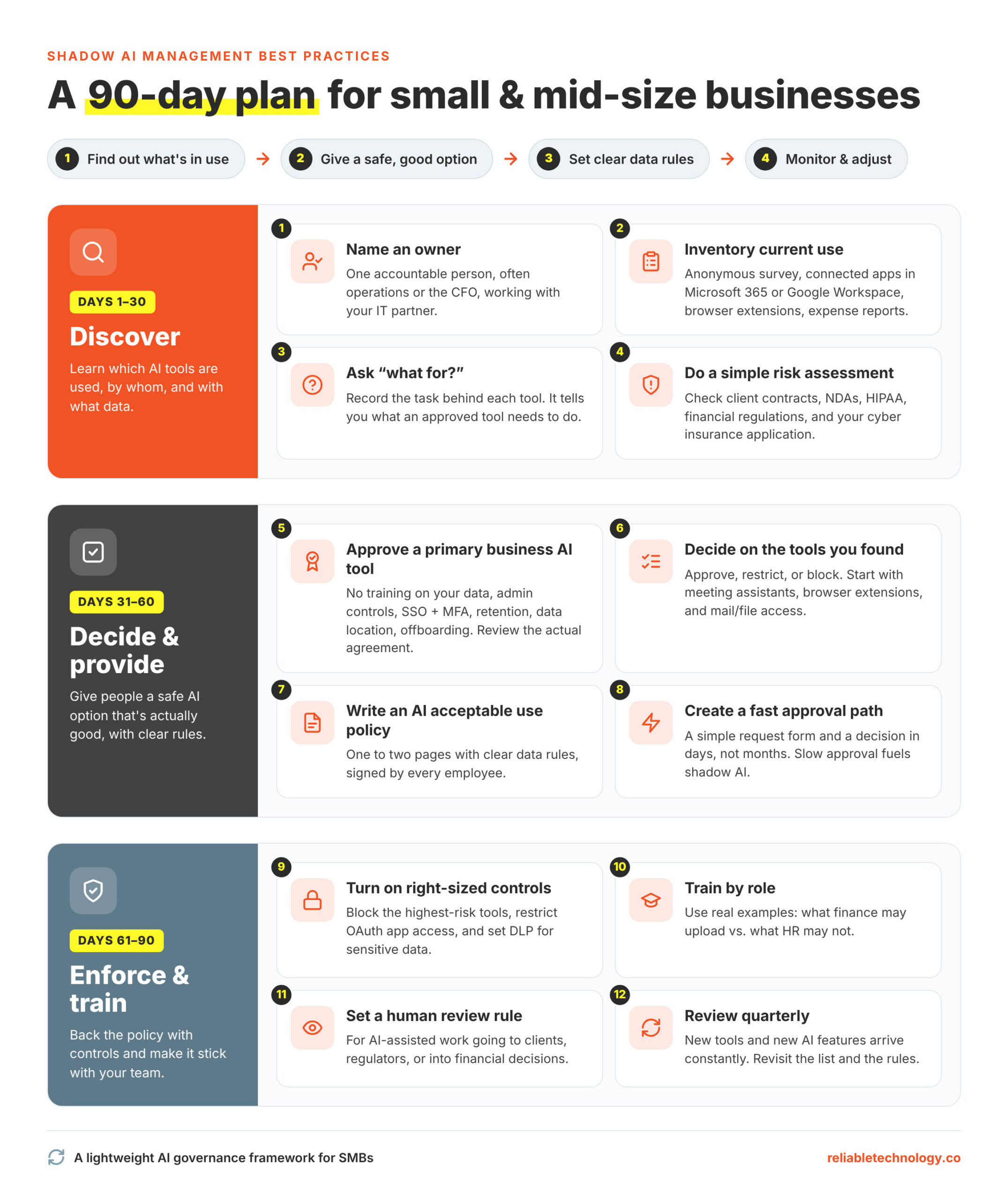
Shadow AI management best practices: a 90-day plan for SMBs
Effective shadow AI management follows one sequence: find out what’s in use, give people a safe option that’s actually good, set clear data rules, then monitor and adjust. Together, these steps form a lightweight AI governance framework for a small and mid-size company.
Days 1–30: Discover
The goal of the first 30 days is a comprehensive understanding of which AI tools are used, by whom, and with what data.
Name an owner. One person (often operations or the CFO, with your IT partner) is accountable for AI decisions.
Inventory current use. Combine an anonymous survey, a review of connected apps in Microsoft 365 or Google Workspace, browser extension lists, and expense reports.
Ask “what for?” Record the task each tool is used for. That tells you what an approved tool needs to do.
Do a simple risk assessment. Check your obligations. Client contracts, NDAs, HIPAA, financial regulations, and your cyber insurance application.
Days 31–60: Decide and provide
Approve a primary business AI tool with business-grade data security terms: no training on your data by default, admin controls, single sign-on and MFA, retention settings, clarity on where data is stored, and the ability to remove a departing employee. Consumer and business tiers of the same product often have different data terms, so review the actual agreement.
Decide on the tools you found: approve, approve with restrictions, or block. Prioritize meeting assistants, browser extensions, and anything with access to mail or files.
Write a short AI acceptable use policy (one to two pages) with the data rules below, and get signatures.
Create a fast approval path. A simple form for requesting new AI solutions and a decision within days, not months. Slow approval is one of the main reasons shadow AI exists.
Days 61–90: Enforce and train
Turn on controls that match your size (see the detection section): block the highest-risk tools, restrict OAuth app access, and set DLP for your most sensitive data.
Train by role, with real examples: what finance may upload vs. what HR may not.
Set a human review rule for anything AI-assisted that goes to clients, regulators, or into financial decisions.
Review quarterly. New tools and new AI features arrive constantly.
The one table every employee should see
A policy only works if people can apply it in the moment. Turn your rules into a simple guide like this:
| Task | Information involved | Approval needed? |
|---|---|---|
|
Draft a social post or job ad |
Public information |
No, any approved tool |
|
Rewrite an internal email |
Internal, non-sensitive |
No, company AI account only |
|
Summarize a meeting |
Depends on attendees and topic |
Approved notetaker only; ask before recording client calls |
|
Analyze a sales spreadsheet |
Customer names, pricing |
Company AI account only; remove unnecessary personal details |
|
Review a client contract |
Confidential client data |
Company AI account only, and only if the client agreement permits it |
|
Work with payroll, SSNs, bank details |
Restricted personal and financial data |
Not permitted without written approval |
|
Process patient or health information |
PHI |
Only in a tool covered by a Business Associate Agreement |
|
Connect an AI tool or agent to email, files, or systems |
Broad access to company data |
Always requires IT approval |
|
Paste passwords, API keys, or credentials |
Secrets |
Never |
Adjust the rows for your industry. The format is the point: task, data, and a clear answer.
What to do if sensitive data was already shared with an AI tool
Treat it as a potential security incident, act quickly, and make it safe for the employee to tell you. People who fear punishment stay quiet, and a quiet incident is the expensive kind.
Find out what was shared: which tool, which account (personal or business), what data, and when.
Contain it: delete the conversation and uploaded files, turn off chat history or training settings, and disconnect any app connections. Change any passwords or API keys that were pasted.
Check the tool’s terms: whether data is retained, for how long, and whether you can request deletion.
Assess obligations: depending on the data and your industry, you may have notification duties under HIPAA, state breach laws, client contracts, or your cyber insurance policy. Bring in legal counsel and notify your insurer early if regulated data is involved.
Document everything: what happened, what you did, and when.
Fix the root cause: usually a missing approved tool, an unclear rule, or a gap in controls.
Put a one-line reporting path in your AI policy, such as: “If you think you shared something you shouldn’t have, tell [name] the same day. You won’t be in trouble for reporting it.”
Five shadow AI risks most guides overlook
Most shadow AI articles are written for enterprise security teams and focus on chatbots. For a 10–150 person business, these five issues often matter more.
1. Shadow AI agents: AI that acts, not just answers
The newest form of shadow AI isn’t a chat window. It’s an AI agent an employee connects to email, files, the CRM, or code repositories, often through a quick “Allow access” screen or a Model Context Protocol (MCP) connection. A chatbot can leak what you paste in; an agent can read, send, edit, and delete using the employee’s own permissions. Reco’s 2026 research found 80% of AI tools in use (including browser extensions and MCP servers) were ungoverned, and that small and mid-size companies averaged about 414 unsanctioned AI tools per 1,000 employees (SC Media). The NCSC also warns that a compromised agent gives an attacker the same access the agent had (NCSC).
What to do: require IT approval for any AI tool that connects to company systems, review app permissions monthly, and remove connections when employees leave.
2. AI hiding inside software you already approved
Your CRM, accounting software, PDF editor, help desk, and video platform have likely added AI features in the last year. Some are on by default. A tool you vetted in 2023 may now send content to a different AI provider under updated terms.
What to do: add “Does this product use AI, and how is our data handled?” to vendor reviews and renewals, and check admin settings for AI features you didn’t choose.
3. AI meeting notetakers and recording consent
Notetakers are one of the most common shadow AI tools in smaller firms. They can join calls automatically, record clients without clear consent, and store transcripts with a third party. Some US states require every participant’s consent to record.
What to do: approve one notetaker, set it to announce itself, and set a rule for client and HR conversations.
4. Client security questionnaires and cyber insurance renewals
Larger clients increasingly ask vendors, “How do you govern employee AI use?” Insurers are asking similar questions at renewal (Cloud Security Alliance). A firm with an AI policy, an approved tool list, and basic monitoring can answer in minutes; a firm without them risks losing a deal or misstating its controls.
What to do: keep a one-page summary of your AI policy, approved tools, and controls ready to share.
5. The owner and leadership team
Executives often handle the most sensitive information (M&A, compensation, legal matters) and, in UpGuard’s research, had the highest rates of regular unapproved AI use (Cybersecurity Dive).
What to do: leadership adopts the approved tools first and visibly. Rules leaders ignore don’t hold.
What does managing shadow AI cost?
For most SMBs, the biggest costs are business AI licenses for staff who need them and a few hours of setup and policy work, not a large security platform. Many companies can start with controls already included in their Microsoft 365 or Google Workspace plan. Dedicated AI governance platforms that report on, redact, and block AI use on employee devices are typically priced per user per month and are affordable for most small businesses. Compare that to the cost of a single incident involving client data, a denied insurance claim, or a lost client relationship.
From shadow AI to managed AI: turning the risk into an advantage
Shadow AI is also a signal: it shows you exactly where your team wants AI to help. Every tool you discover comes with a task attached, and those tasks are your best candidates for formal adoption.
Look for patterns. If several people in sales use the same AI email plugin, or finance keeps using AI for spreadsheet analysis, that’s real demand.
Vet the tool or find a safer equivalent. Check business-plan data terms, training defaults, admin controls, retention, and fit with your industry requirements.
Pilot with the people already using it. They know the workflow and will tell you quickly whether the approved version is good enough.
Document and share what works. Short prompt guides and examples move the rest of the team onto approved tools faster than a policy memo.
The businesses that get the most from AI aren’t the ones that block it or ignore it. They’re the ones that give people good tools, clear rules, and a fast way to ask for more. That’s what responsible AI use looks like in a small business.
How RTS helps businesses manage shadow AI
Your employees are probably already using AI. The goal isn’t to stop them; it’s to make sure your client data, financial information, and reputation stay protected while your team gets the productivity benefits.
For existing clients, as part of our AI governance, RTS already uses a tool for shadow AI reporting. We install the tool on each employee’s computer. We work with your business to decide which AI tools (such as major LLMs) fall into which category:
Approved: employees can use the AI tool (such as ChatGPT), including with private company information.
Unapproved: the tool can be used, but sensitive details such as email addresses and phone numbers are automatically replaced with labels (for example, “email address”) before anything reaches the AI.
Blocked: the tool won’t accept any input, and file uploads can be blocked as well.
The platform also reports on AI use across the company and can show your AI policy to employees at the moment they try to use a tool, so guidance appears where the decision happens. “This is brand new stuff,” says Michael Yudovin, CTO of RTS. Only a handful of IT vendors offer this kind of control so far, and features are being added quickly, so we review options as the market changes.
Reliable Technology Services helps small to mid-size businesses:
Discover which AI tools, extensions, and agents are in use today
Configure the AI and security controls already included in Microsoft 365 or Google Workspace
Select and roll out a business-grade AI tool your team will actually use
Help write a practical AI acceptable use policy and the “task / data / approval” guide for your staff
Deploy an AI governance platform that reports on AI use, redacts sensitive data, and blocks unapproved AI tools on employee devices
Monitor for new shadow AI and prepare answers for insurance renewals and client security questionnaires
If you have any questions regarding this topic or need help address shadow AI at your business, contact Lenny Giller at lenny@reliabletechnology.co.