
Email Security for Small Business: The Best Practices That Actually Stop Attacks
One in three messages arriving at your business today is malicious or unwanted spam. Nearly half of those are phishing attempts. And when one of those attempts work, the average business email compromise can cost you more than $122,000.
Those numbers all point to one conclusion: attackers have decided your inbox is their best way in to your wallet.
The reason is simple. Email touches everything you run on; your banking, payroll, client files, plus the password resets for every other system you own.
The encouraging part is that email security for small business doesn’t require an enterprise budget. The controls that stop most email attacks are ones you can put in place yourself.
What’s missing for most business owners is knowing which ones matter most, what order to tackle them in, and what “done right” actually looks like when you’re finished.
So, we put together this guide to give you that leg up. In this blog, we’ll cover:
Why criminals aim at small businesses specifically
The email security best practices that block most attacks, and the order to roll them out in
What to do the moment you suspect an account is compromised, and how to keep it from happening twice
What Makes Small Businesses a Prime Target for Email Attacks?
Email is the top attack vector for cybercriminals, and small businesses sit right in the middle of the target for two main reasons:
Lack of Resources
Large enterprises have layered defenses and tools that flag a strange login within minutes. Small and medium sized businesses often have one person handling IT between other duties and no reliable way to tell whether last Tuesday’s login from another state was legitimate. This makes you a great target.
You’re an Entry Point
The other reason you get targeted is that you’re a doorway. If you do work for a larger hospital or law firm, your email relationship with that client is trusted. An attacker who controls your inbox can send an invoice from your real domain to your biggest customer, and it sails through their filters because it came from you.
What Email Threats Should Small Businesses Be Aware Of?
Email threats fall into four buckets. Each one looks different in practice, and each one needs a different defense.
Phishing Email and Spear Phishing Attacks
Mass phishing attacks go out to thousands of addresses at once, usually posing as a shipping notice, a password expiration warning, or a shared file. They’re a numbers game.
Spear phishing is where these attacks start getting a bit creepy. These are targeted attacks built from your website, your LinkedIn, and your public vendor list. One common version: a message from your vendor’s contact, sent from a lookalike Gmail address instead of their company domain, asking you to update the payment details on file.
Business Email Compromise
Business email compromise doesn’t rely on any malware. There’s no attachment to scan and no link to block, only a believable request from someone you trust.
A message that appears to come from you asks the office manager to move a wire before end of day. A “new employee” asks HR to change their direct deposit. These attacks work because they exploit your routine. Recovering the money is rare once it moves.
Malicious Links and Malicious Software
The older playbook still works. A malicious link drops you on a fake Microsoft 365 login page that harvests your credentials. An invoice attachment installs malicious software that spreads to your file shares. Both usually arrive as something your team opens fifty times a week.
Account Takeover
Account takeover is what happens after credentials get stolen.
Attackers sit for a while, read your email, learn your payment cycles, investigate your financial records, and create hidden inbox rules that auto-delete replies so you never see the conversation they’re having with your clients. By the time anyone notices the account compromise, invoices have already gone out from your verified domain.
Benefits of Email Security
The risk from every one of these threats can be significantly reduced. Here’s what happens when you put the right protections in place.
- Fewer incidents to clean up: Blocking malicious emails before delivery costs a fraction of what it costs to investigate a breach afterward.
- Business continuity: A compromised mailbox can freeze invoicing, payroll, and client communications for days. Layered protection keeps your business running.
- Protecting users from decisions they shouldn’t have to make: Good filtering means your team faces fewer judgment calls on messages designed to fool them.
- Compliance you can prove: If you handle health, financial, or client data, encryption and access controls help you ensure compliance and answer audit questions with evidence.
- Lower insurance friction: Most cyber policies now require MFA and email authentication. Having them in place affects both eligibility and premium.
- Client trust that stays intact: Nothing damages a referral relationship faster than a fraudulent invoice sent from your address.
Email Security Best Practices for Small Businesses
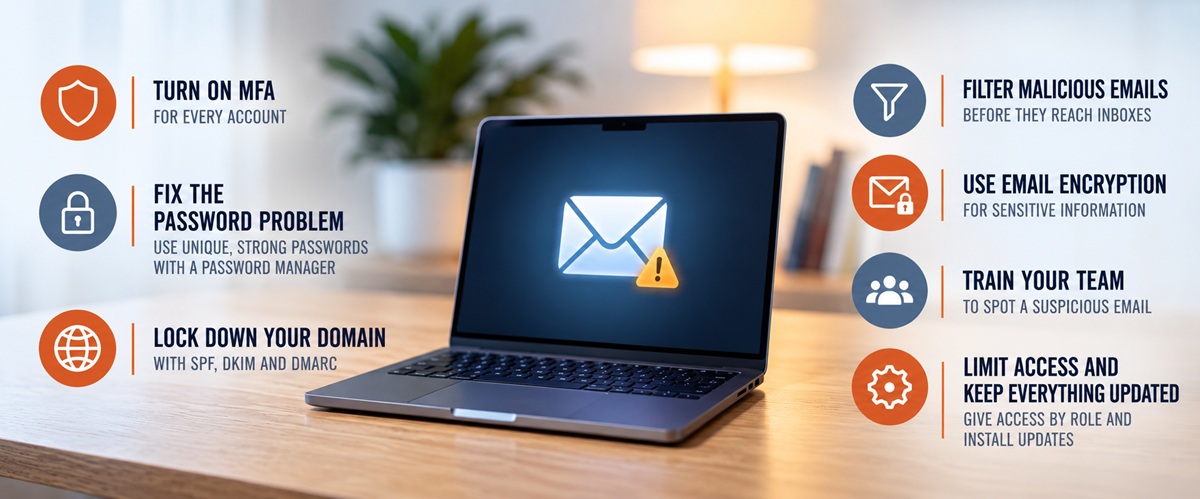
Small businesses often skip several overlooked steps that can quickly make your email much more secure. Work through these in order. The first three block the majority of attacks and cost almost nothing.
Turn On Multi-Factor Authentication (MFA) for Every Account
Multi-factor authentication is a login that requires two or more pieces of proof before an account will open. The first is something you know, meaning your password. The second is something you have, like a code from an authenticator app or a tap on a physical security key, or something you are, like a fingerprint or face scan.
This is pretty common practice for many businesses. When your bank asks for a six-digit code after you enter your password, that’s MFA. However, small businesses often don’t have it active.
Turn it on everywhere your business logs in, not only on email accounts. Attackers pivot from one system to the next, so a single unprotected login undoes the work you did everywhere else. Make sure to cover these:
- Admin accounts first: one compromised admin login can switch off every other control on this list
- Email (Microsoft 365, Google Workspace): the account that resets the password for everything else
- Banking and payment platforms: where the money actually moves
- Accounting and payroll software: direct deposit details and vendor records live here
- Cloud storage: OneDrive, Google Drive, Dropbox, SharePoint
- Your CRM and client portals: the sensitive data your clients trusted you with
- Remote access and VPN: the front door to everything else on your network
Fix the Password Problem
MFA protects you when a password leaks. Strong passwords reduce how often that happens in the first place. Four rules cover almost all of it:
- Every login gets its own password. When someone reuses the same password across accounts, if one gets compromised attackers take that password and try it everywhere.
- Length beats complexity. Aim for 14 characters or a short passphrase instead of sprinkling capital letters through a six-letter word.
- Give the whole team a password manager. It’s the only thing that makes the first two rules realistic.
- Never store credentials in plain text. No shared spreadsheets, no sticky notes, no browser autofill on shared machines.
On top of that, require a password change when there is evidence or reason to believe an account or password has been compromised.
Lock Down Your Domain with SPF, DKIM, and DMARC
Three email authentication protocols stop criminals from sending mail that appears to come from your domain. They work as a set, and each one handles a different part of the job.
SPF: Who Is Allowed to Send as You
SPF specifies which mail servers are authorized to send email on behalf of your domain. You publish that list once, and receiving servers check every incoming message against it.
DKIM: Proof the Message Wasn’t Tampered With
DKIM adds a cryptographic signature created with a private key that only you hold. Receiving servers verify that signature against the matching public key published in your DNS. If anyone altered the message in transit, the signature breaks and the check fails.
DMARC: What Happens When a Check Fails
DMARC ties the first two together. It tells receiving servers what to do with messages that fail your domain’s authentication checks, such as quarantine or reject them, and provides reports showing who is sending email using your domain.
This is email infrastructure work, usually about an hour of DNS changes for someone who has done it before. It protects your reputation inside everyone else’s email systems, which is where a spoofing attack does the most damage.
Filter Malicious Emails Before They Reach User Inboxes
Microsoft 365 and Google Workspace include basic cloud email security. They catch obvious spam and known malware, and that’s a reasonable floor.
The problem is that modern attacks arrive with no attachment and no malicious links, carrying nothing but a plausible request in plain language. Traditional filters have fewer obvious indicators to grab onto.
A secure email gateway or advanced threat protection layer adds what’s missing: link scanning at the moment of click, attachment sandboxing, and behavioral analysis that learns how your people normally write and flags messages that don’t fit the pattern.
Use Email Encryption to Make Secure Email the Default
Most modern email platforms encrypt messages while they’re in transit, but that doesn’t provide the same protection as encrypting the message itself. For sensitive information, additional email encryption can help ensure that only authorized recipients can access the contents.
Fortunately, these protections have gotten far simpler to deploy. Modern email platforms and security tools can make secure communication relatively seamless for users, while secure messaging portals provide additional protection when exchanging especially sensitive information.
Train Your Team to Spot a Suspicious Email
Training is one of the most underfunded lines in small business budgets, which is odd given how cheap it is and how much it returns. Educated employees turn from the weakest link into experts who understand the security threats aimed at them.
Limit Access and Keep Everything Updated
Give each person only the access their job requires. When an account gets compromised, that boundary decides whether you lose one mailbox or the whole file server.
Keep your email client, browsers, and cloud storage apps patched. Attackers lean on known vulnerabilities far more often than new ones, and updates close those doors for free.
Even with all of this running, something can eventually get through. What you do in the next hour determines how bad it gets.
How Should a Small Business Respond to a Suspected Email Breach?
Move in this order:
- Change the password and sign out every active session: A password change alone won’t help if the attacker’s session is still open.
- Check for inbox rules: Look for anything auto-forwarding, auto-deleting, or moving messages to obscure folders. This is where attackers hide, and it’s the step most businesses skip.
- Review the sent folder: Find out what went out and to whom while the account was open.
- Pull the login history: Look for sign-ins from unfamiliar locations, devices, or times, and note when they started.
- Preserve the evidence: Don’t delete the suspicious email or wipe the mailbox. You’ll need it to find the entry point and, if it comes to it, for your insurance claim.
- Notify anyone who received mail from that account: Clients and vendors need to know before they act on a fraudulent invoice.
- Find the root cause: An account compromise you don’t explain is one you’ll repeat.
How Small Businesses Can Develop a Long-Term Email Security Strategy?
Setting up controls once and walking away is how businesses end up breached two years later with everything technically “in place.”
Make Business Email Security Part of Your Cybersecurity Plan
Email deserves its own section in your cybersecurity plan, with an owner attached.
Build in multiple layers so no single failure becomes a breach. Technical controls catch most of it, training catches the rest, and clear policy enforcement keeps both consistent as you hire. That layered structure is also what auditors and insurers want to see when you need to ensure compliance.
Continuous Monitoring Beats an Annual Checkup
Small business email security degrades quickly. Employees leave and their mailboxes stay active. Someone turns off MFA to fix a login issue and never turns it back on.
Continuous monitoring catches that drift before it becomes an opening. Put these on a recurring schedule:
- Review login behavior for sign-ins from unfamiliar locations, devices, or hours that don’t match how your team actually works
- Read your DMARC reports instead of filing them, since they show you who is trying to spoof your domain right now
- Audit accounts quarterly and close out former employees and unused logins
- Watch for new inbox rules and forwarding changes, which are the first thing an attacker sets up after getting in
- Confirm your controls are still on, because MFA and filtering get disabled during troubleshooting and rarely get switched back
That kind of regular auditing turns potential threats into small fixes instead of incidents worth reporting.
Bring In Some Expert Assistance
Most of what’s on this list you can set up in an afternoon. Keeping it consistent a year from now is where things get tricky.
The burden of that ongoing work is why most savvy small businesses use managed service providers (MSP). A good MSP owns these ongoing responsibilities for you:
- Configuring MFA, SPF, DKIM, and DMARC correctly the first time, then verifying they stay configured
- Layering real threat protection over Microsoft 365 or Google Workspace instead of trusting the defaults
- Watching accounts for suspicious logins and new forwarding rules, including at 11 p.m. on a Saturday
- Running phishing simulations and training so your team gets sharper instead of drifting
- Picking up the phone when something looks wrong and walks the response with you
You get the protection a much larger company has, without hiring for it.
That’s the work we do at RTS for small businesses across the region. If you want to know where your email security stands right now, contact Lenny Giller at lenny@reliabletechnology.co and let’s start the conversation.