
Data Backup and Recovery: Understanding the Difference
You already have backups. But does that actually mean you can recover your data?
At first, the question sounds like splitting hairs. If you’ve got backups, then you should be able to recover them, right?
Here’s the part that isn’t obvious: plenty of businesses have lost their data for good that still had backups. They just couldn’t restore them fast enough, or completely enough, to save their business, and no one caught the problem until the day it mattered.
The businesses that recovered and the ones that folded weren’t separated by budget or bad luck. They were separated by whether someone understood the key difference between backups and recovery.
To help you maximize both methods, in this blog, we’ll cover:
What data backup and data recovery actually are, and why they aren’t the same thing
Where disaster recovery and business continuity fit in, and why the terms get mixed up
How to tell if your current backup setup would really save your business when something goes wrong
What Is Data Backup?
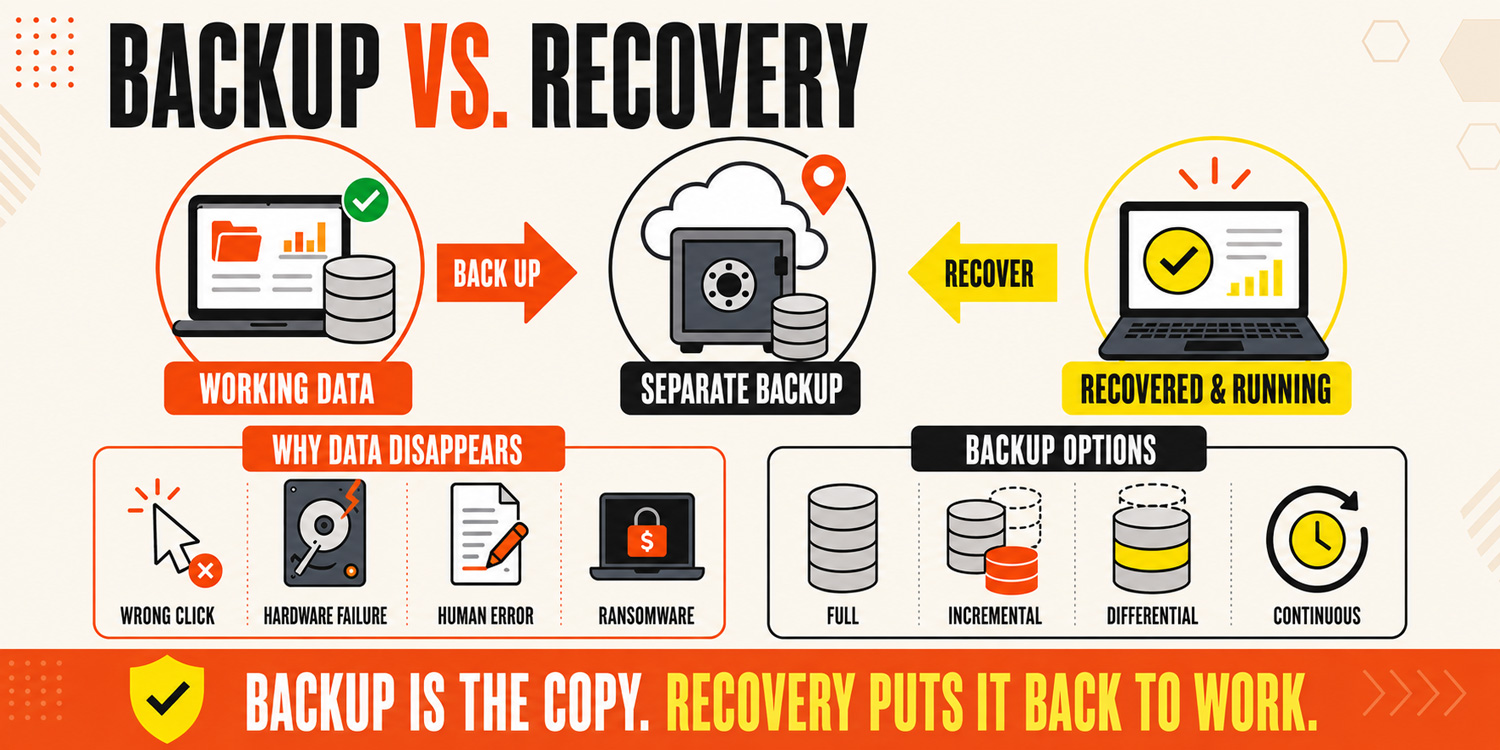
A data backup is a second copy of your data, kept somewhere separate from the original. If the first copy gets lost or damaged, you still have the backup to fall back on.
That “somewhere separate” part matters. Your backup data might sit on physical devices like an external drive or a network storage device, or in cloud storage hosted offsite. Good backup storage keeps your copies away from the original, so one bad day can’t take out both.
Backups exist because data disappears in ordinary ways, not just dramatic ones:
A wrong click can delete data you still needed (accidental deletion)
A hard drive or server quits without warning (hardware failure)
Human error overwrites or corrupts something important
Ransomware locks or scrambles your files
Most backup systems run on a set schedule, storing data like your files, critical databases, or even your entire system so a recent version is always waiting. This backup process runs silently in the background, which is exactly why it’s easy to assume it has everything covered.
What Are the Main Types of Data Backup?
Not all backups work the same way. The type you use affects how much time and storage space it takes, and how much data you’d keep if something went wrong.
Full backup: Copies all of your data every time it runs. The most complete option, but it uses the most storage space and takes the longest.
Incremental backup: An incremental backup captures only the data that changed since the last backup. It’s fast and light on storage, which makes it popular for daily use.
Differential backups: Copy everything that changed since the last full backup. They sit between the other two on speed and storage.
Continuous data protection: Backs up changes as they happen, in near real time. This is where modern backup solutions shine, since you lose almost nothing between saves.
The right mix of backup solutions depends on how much data you generate and how much you could afford to lose.
But here’s the catch that trips people up: having any of these copies is only half the job. What actually counts is whether you can turn them back into a running business, and that’s a different process entirely.
What Is Data Recovery?
Data recovery is the process of getting your data back after it’s lost, corrupted, or wiped out. It takes backup copies and turns them into working files, systems, and databases your team can actually use again.
If backup is the copy you make ahead of time, the recovery process is the work of putting that copy back into action when something goes wrong. It’s the half that runs under pressure, usually on a bad day, with people waiting on you to restore lost data fast.
What Are the Main Types of Data Recovery?
The right recovery method depends on how much and what you lost and how fast you need to restore data. Common approaches include:
File-level recovery: Pulls back lost or damaged data, like after an accidental deletion. Quick and simple.
Full system recovery: Rebuilds your entire system after a hardware failure or ransomware attack, including the setup around your files, not just the files themselves.
Cloud recovery: Spins your systems back up from cloud backups, so your team keeps data access and keeps working even if the office hardware is gone.
Point-in-time recovery: Rolls your data back to a specific moment before the problem hit, which matters when corruption has spread silently over time.
Good recovery software and recovery solutions handle the heavy lifting, moving your primary data out of the recovery backup and back into the production data your business runs on.
The goal is simple: fast, complete data retrieval with as little lost along the way as possible.
What Is the Difference Between Backup and Recovery?
Here’s the distinction in one line: a backup is the copy, and recovery is getting that copy back to work.
Think of a spare tire. The backup is having the spare in your trunk. Recovery is being able to change it on the side of the road before you’re late for the meeting. Owning the spare does you no good if you can’t get it on the car quickly.
Plenty of tools bundle the two as backup and recovery software, which makes it easy to assume they’re one feature. However, they’re built for different jobs, and a backup and recovery setup is only as protected as its weaker half.
But what happens when the problem is bigger than a lost file, when one event knocks out your systems all at once? That’s where disaster recovery comes in.
Backup and Disaster Recovery vs. Business Continuity
Backup and recovery handle your data. But a fire or massive ransomware attack can take out your systems, your hardware, and your ability to work all at once. That’s a much bigger problem than restoring a few files, and it needs a bigger plan.
Three terms get mixed up here, so let’s line them up:
Backup: The copies of your data, ready to be restored. This is the raw material everything else depends on.
Disaster recovery: The plan and process for getting your systems and data back online after a major event like a system failure, equipment failure, or natural disasters. A disaster recovery plan spells out what gets restored, in what order, and how fast.
Business continuity: Keeping your business operations running during and after the event, including your people, phones, and processes, not just your technology.
Modern disaster recovery backup often runs through the cloud or a second data center, so even if your office is offline, your entire system can come back somewhere else.
You can see how backup and disaster recovery work together, and why business continuity depends on both. But here’s the uncomfortable part: having all three on paper doesn’t mean they’ll actually work when you need them.
Why Do Backups Alone Fail to Guarantee Business Continuity?
This is where a lot of businesses get a nasty surprise. Backups running in the background feel like protection, right up until the day you actually lean on them, and the gaps surface all at once. Here are the most common ways reliable backups still let a business down:
Never tested: A backup can run for months while saving corrupt or incomplete files. Without regular test restores, you won’t know your data integrity is broken until you try to use it.
Too slow to matter: If restoring everything takes three days and your business can’t sit idle for even three hours, the backup technically worked but still failed you.
Out of date: When your last backup ran a week ago, a clean restore still means a week of important data gone, which adds up to significant data loss.
Hit in the same attack: Cyber threats like ransomware can reach a backup that stays connected, locking or corrupting those copies right alongside the originals.
Left unlocked: Backups without proper access controls can expose sensitive data and turn a recovery tool into another door for data breaches.
The Two Numbers That Actually Measure Protection
Real data protection comes down to two targets, and every reliable backup plan should define them.
Recovery point objective (RPO): How much data you can afford to lose, measured in time. A one-hour RPO means your backups run often enough that you’d never lose more than an hour of work.
Recovery time objective (RTO): How fast you need to be back up. A four-hour RTO means your systems and critical databases must be running again within four hours of going down.
Set those two numbers against your current setup, and you’ll quickly see whether it delivers rapid recovery or just a false sense of security. Meeting them consistently, while staying ahead of data corruption, cyber threats, and regulatory compliance, is the real work. And that work is exactly where a plan comes in.
How Do You Build a Backup and Data Recovery Strategy?
A good strategy turns “we have backups” into “we know we can recover.” You don’t need enterprise tools to get there, just a clear plan and the discipline to follow it. Here’s what that looks like:
Know what you’re protecting: List your critical data and where it lives. Data sources typically include email, accounting systems, customer records, and shared drives, and you can’t protect what you haven’t mapped.
Set your RPO and RTO: Decide how much data you can lose and how long you can be down. Those two numbers shape every other choice in your backup plan.
Follow the 3-2-1 rule: Keep three copies of your data on two types of data storage, with one offsite. A cloud backup covers that offsite copy and keeps a fire or theft from taking everything at once.
Pick the right tools: Modern backup and recovery software automates the whole cycle, from incremental backups to fast restores. Good backup software and backup tools handle it quietly and alert you the moment something breaks.
Lock it down: Put access controls on your backups so a compromised login can’t reach them. Reliable backups are worthless if an attacker can delete them.
Test your restores: Run real recovery drills on a schedule. A restore you’ve practiced is the only kind you can trust when it counts.
Do all six, and you’ve got more than a backup plan. You’ve got a recovery plan, which is the part that actually saves your business.
Where Most Small Businesses Get Stuck
None of these steps are complicated on their own. The hard part is doing them consistently, month after month, on top of running your company. Recovery strategies only work when someone owns them. For most small businesses, that ongoing attention is exactly what’s missing.
And that’s the honest reason so many “protected” companies aren’t.
When to Bring in a Backup and Recovery Partner
Backups are easy to start and easy to trust. Recovery is the part that has to be built, tested, and ready before the day you actually need it. This takes steady attention that most small teams can’t spare on top of everything else.
That’s what a managed IT partner is for. A good data backup and recovery service doesn’t just set up your copies and walk away. It handles the ongoing work:
Designs your recovery plan around your RPO and RTO: so you know how much data you could lose and how fast you’d be back up
Tests your restores on a schedule: because a backup nobody has tried to recover from is just a guess
Watches for failures: to catch a backup that silently stopped running before you need it
Keeps your data protection current: as your business grows, adding new systems, users, and locations to the plan as they arrive
At RTS, that’s exactly the work we take off your plate. We build and manage the full recovery solution, from cloud backups to disaster recovery. You focus on running your business, and we make sure you’re covered for when business doesn’t run as usual.
If you’re not sure your current setup would hold up, that’s worth a conversation. Contact Lenny Giller at lenny@reliabletechnology.co to find out where your backup and data recovery really stand, and how we can close the gap.